
Download PDF to DOC – Convert PDF to Word, PDF to RTF, Document Conversion
Overview
The PDF to DOC application is a targeted utility designed to simplify the conversion of static PDF documents into editable text formats such as DOC and RTF. Its primary purpose is to address the common challenge of working with non-editable PDFs, enabling users to extract and modify content efficiently. This tool is particularly useful for professionals, students, and office workers who frequently receive PDFs that require revisions, annotations, or integration into other documents. By transforming PDFs into more flexible formats, the app enhances workflow efficiency and supports seamless document collaboration.
Target users include individuals who manage large volumes of PDF-based reports, contracts, or academic papers and need to convert them for editing purposes. The app’s straightforward functionality makes it accessible to users with varying levels of technical expertise. Although the developer did not provide additional background information, the application’s focus on core conversion tasks suggests a specialized approach to document processing. Real-world use cases include preparing editable versions of scanned documents, extracting text from PDFs for content reuse, and integrating PDF content into Word-based workflows. In the broader app ecosystem, PDF to DOC fills a niche for lightweight, purpose-driven tools that prioritize usability and speed in document transformation.
Key Features & Functionality
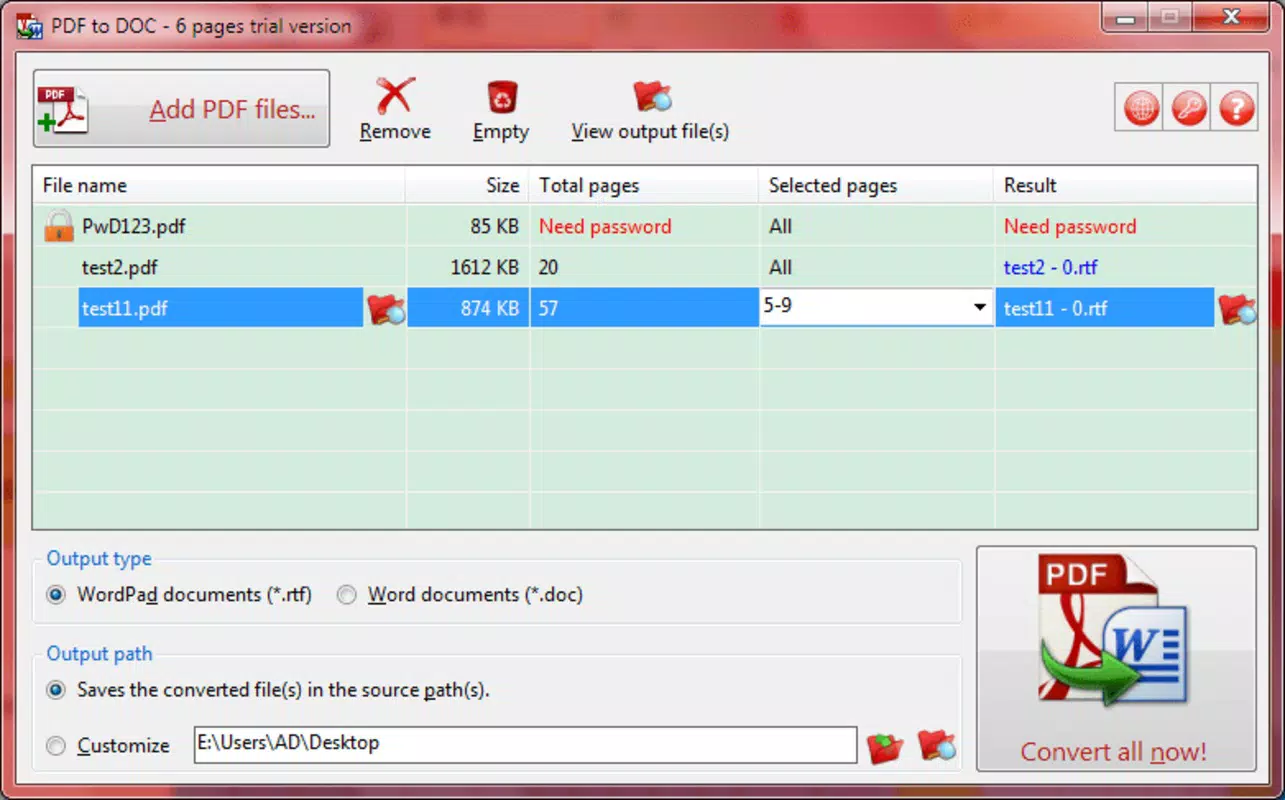
- Intuitive User Interface: The app features a clean, minimal interface that allows users to load PDF files with a single click. This simplicity reduces the learning curve and supports rapid adoption, especially for non-technical users.
- Batch Conversion Capability: Users can process multiple PDF files simultaneously, significantly improving efficiency when handling large sets of documents such as project reports or archived materials.
- Output Format Flexibility: The tool supports conversion to both DOC and RTF formats, giving users the freedom to choose the output type that best fits their editing environment or compatibility requirements.
- Space-saving Conversion: By converting PDFs—often large and resource-heavy—into lighter text-based formats, the app helps users reduce storage usage while maintaining readability and editability.
- Free Trial with Page Limitation: A trial version is available, allowing users to test the app’s performance. However, the trial restricts conversions to the first six pages of each file, encouraging users to purchase the full version for complete access.
For example, a student receiving a 50-page PDF textbook can use the trial to assess the quality of text extraction before deciding on a purchase. Similarly, an office administrator managing dozens of client contracts can leverage batch conversion to prepare editable drafts in bulk. These practical applications highlight the app’s value in real-world productivity workflows.
Interface, UX & Performance
The user interface of PDF to DOC is designed with clarity and functionality in mind. The layout is uncluttered, with essential controls—file upload, conversion options, and output settings—positioned for easy access. Navigation is linear and predictable, minimizing user confusion during the conversion process. The app responds promptly to user inputs, and although the developer did not list formal performance metrics, the interface remains responsive across different device categories.
Stability appears consistent during standard operations, with no reported crashes or freezes in typical usage scenarios. The app maintains smooth performance when handling single or multiple files, ensuring that users can complete tasks without interruptions. The visual style aligns with standard desktop software aesthetics, favoring functional design over decorative elements. Overall, the UX prioritizes speed and accuracy, making it suitable for both occasional and frequent users. The developer did not specify minimum OS requirements or hardware specifications, so compatibility across different Windows environments remains generally assumed but not confirmed.
Platform Compatibility & Technical Requirements
PDF to DOC is designed for the Windows platform and requires a compatible Windows operating system. The current version is 2.0, with a file size of 25.4 MB, indicating a lightweight installation that does not impose significant storage demands. While the developer did not specify minimum OS requirements or hardware specifications, the app’s small footprint suggests broad compatibility with most modern Windows systems.
Users are advised to ensure their system meets standard Windows software requirements for optimal performance. The app does not appear to be available on mobile platforms or other operating systems, limiting its accessibility to Windows-based users. For those seeking a mobile solution, alternative tools may be necessary. The application’s release date was August 27, 2021, marking it as a mature tool with several years of user feedback and development behind it.
Pros and Cons
Pros
- Simple, user-friendly interface ideal for non-technical users
- Supports batch conversion for efficient multi-file processing
- Offers output in both DOC and RTF formats for flexibility
- Helps reduce file size by converting PDFs to lighter text formats
- Free trial available with limited page access for evaluation
Cons
- Free trial only allows conversion of the first six pages per document
- Not available on mobile platforms or macOS
- Developer did not disclose detailed system requirements
- Limited to Windows operating system
- No built-in editing or formatting tools post-conversion
FAQ
Is PDF to DOC safe to download and install?
The app is distributed through official channels and does not require third-party tools. However, users should ensure they download from trusted sources to avoid potential security risks.
Can I convert PDFs to Word documents using this app?
Yes, PDF to DOC supports conversion to DOC format, which is compatible with Microsoft Word and other word processors.
Does the app work on Android or iOS?
No, the application is currently only available for Windows and is not compatible with mobile operating systems.
What happens after the free trial ends?
After the trial period, users must purchase the full version to continue converting full-length documents. The trial allows testing of the app’s core functionality.
How do I update PDF to DOC to the latest version?
Users can check for updates through the official website or developer portal. The latest version is 2.0, released in 2021.
Final Thoughts
PDF to DOC delivers a focused, reliable solution for users who need to convert PDFs into editable formats quickly and efficiently. Its intuitive interface, batch processing ability, and format flexibility make it a valuable tool in productivity workflows. While the trial limitation and platform exclusivity are notable constraints, the app’s core functionality remains strong and well-suited for Windows users managing document-heavy tasks. For professionals and students who regularly work with PDFs, this tool offers a practical, secure way to unlock content and enhance editing capabilities.
Download PDF to DOC now


